
Usenet Newsreaders Explained: How to Choose the Right One

Quick Answer
A Usenet newsreader is the software that connects to your Usenet provider, retrieves articles, and organizes them. Choose one based on ease of use, automation, speed controls, and how you prefer to search Usenet.
What Is a Usenet Newsreader?
A Usenet newsreader is the main tool used to access Usenet. It connects to your provider using your account credentials and pulls articles from newsgroups.
It handles three core tasks:
- Connecting to your Usenet server
- Managing article retrieval and repair
- Organizing what you access into a usable format
Without a newsreader, there is no direct way to interact with Usenet servers.
Types of Usenet Newsreaders
Most tools fall into a few practical categories based on how they access articles and how much setup they require.
NZB Downloaders
Focused on fast access using NZB files. These tools do not browse text newsgroups directly.
Examples include SABnzbd and NZBGet. They are optimized for speed, automation, and background processing. This is the most common setup for users who rely on Usenet search sites.
All-in-One Newsreaders
Combine a full newsreader with built-in Usenet search.
These tools can access all newsgroups and include an integrated search interface, removing the need for a third-party Indexer. They are the simplest option and reduce setup to a single application.
Standard Newsreaders
Provide full access to newsgroups but do not include built-in search.
Examples include GrabIt. These require a separate Usenet search site to find posts, but still allow direct browsing and manual access to newsgroups.
Web-Based Access
Some providers offer Web-based Usenet access instead of requiring installed software.
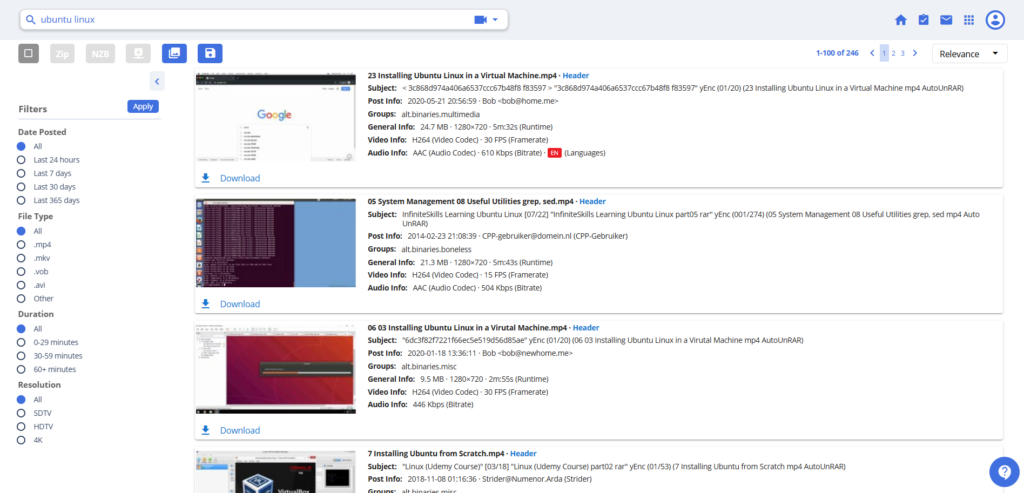
Easynews is the primary example. It provides a Web-based Usenet search that allows you to read posts directly in your browser, including on mobile devices. This removes the need for a traditional newsreader and simplifies access across different devices.
Comparison of Usenet Newsreader Types
| Type | Setup Difficulty | Requires Indexer | Supports Text Newsgroups | Built-in Search | Best For |
| NZB Downloaders | Moderate | Yes | No | No | Speed, automation, high-volume access |
| All-in-One Newsreaders | Low | No | Yes | Yes | Simple setup, all-in-one access |
| Standard Newsreaders | Moderate | Yes | Yes | No | Manual browsing and flexibility |
| Web-Based Access | Very Low | No | Yes | Yes | Mobile access and zero setup |
Key Usenet Newsreader Features That Matter
Ease of Setup
Look for a clean interface and guided setup if you want to get started quickly.
Speed Controls
Adjust connection count and performance settings.
NNTP pipelining is only available in SABnzbd. It requests multiple articles at once and can improve speed in higher-latency scenarios.
Automation Support
Useful for background processing and hands-off access.
Built-In Repair and Extraction
Handles split articles automatically without manual steps.
Search Options
Use either an external Indexer or a newsreader with built-in search. Integrated search is easier. External tools provide more control.
How to Choose the Best Usenet Client
If You Want Simplicity
Use a newsreader with built-in search.
If You Want Control
Use a desktop client like SABnzbd or NZBGet.
If You Want Automation
Choose a client with integration support and background processing.
If You Care About Speed

Focus on connection limits, latency, and pipelining. Tuning settings matters more than switching software.
Basic Setup Overview
- Enter your provider details (host, username, password)
- Select a port (563 for SSL, 119 for standard access)
- Set connection count
- Test connection
- Save and begin accessing articles
Once connected, the newsreader handles the rest.
Common Mistakes to Avoid
Using Too Many Connections
More connections do not always improve speed. Gains drop once bandwidth is saturated.
Ignoring SSL
SSL encrypts your connection and should be enabled in most cases.
Overcomplicating Setup
Start simple. Confirm stable access before adding extra tools.
FAQ
The best Usenet newsreader depends on your needs. SABnzbd is strong for speed tuning and automation. NZBGet is lightweight and efficient. Integrated options are easier for beginners.
Not always. Newsreaders with built-in search remove the need for a separate Indexer. External Indexers offer more control but add setup steps.
Yes. Connection settings, pipelining, and how the software handles requests can impact performance. Server quality and latency still matter more.
Yes. Connection settings, pipelining, and how the software handles requests can impact performance. Server quality and latency still matter more.
SABnzbd has more active development and features like NNTP pipelining. NZBGet is lighter and uses fewer system resources. The better option depends on your setup.
Yes. SSL encrypts the connection between your device and the Usenet server and is standard practice.
Final Recommendation
A Usenet newsreader is the core tool for accessing Usenet. Start with a simple setup, confirm stable access, and adjust based on your needs.
Use an all-in-one newsreader or Web-based access for simplicity. Use NZB downloaders like SABnzbd or NZBGet for speed and automation, or a standard newsreader if you prefer manual browsing.
Choose based on how you use Usenet, not feature count.